Free curated list of easy to use, must have top 10 Product Manager tools. These product management tools are recommended to help you become a successful PM!
These tools are a part of the daily routine for most Product Managers.
By the way, whether you are a Product Manager or a Project Manager, these tools should be helpful to you.
Even if you are a Scrum Master or PMP certified professional, these tools will be necessary for you.
Best Product Manager Tools
Remember, there is no "standard" product management tool.
The best investment is in the tools of one's own trade.
Benjamin Franklin
But how do you choose the right tools?
Various aspects of our job require us to use various tools. It is important to choose the right tool within that particular aspect of our job.
The first step to choosing the right tools is actually understanding all the key product management skills.
You may already be familiar with most of them.
Or you may be new to the field of product management.
Either way, it is always a good idea to refresh your memory with these required skills.
Skills
All the tools in the world will not help if you do not take time to understand the basics of product management.
You know what they say -
A bad workman always blames his tools.
If you look closely, each category of tool below corresponds to one of the essential Product Manager skills.
Product Manager Tools - Categories
Tools for product managers can be divided into the following 10 categories -
-
Task and issue tracking
-
Requirements and PRDs
-
Customer interviews and feedback
-
Mockups and prototypes
-
Roadmapping
-
Meetings and team communication
-
Presentations
-
Customer onboarding
-
Analytics, heatmaps and experimentation
-
AI assistants
I will be providing examples of the best tools within each category of product management tools.
Product Management Tools - Best Examples
I would not say that there is a single product management software. Instead, the product management process is achieved through a combination of various product manager tools.
Let's review the essential product manager toolkit.
Task and issue tracking
You don't want your task management tool to be too complex. The tool is only a means to an end.
It should not become a process in itself.
So, it should be easy and not take too much of your time (learn the basics of Jira).
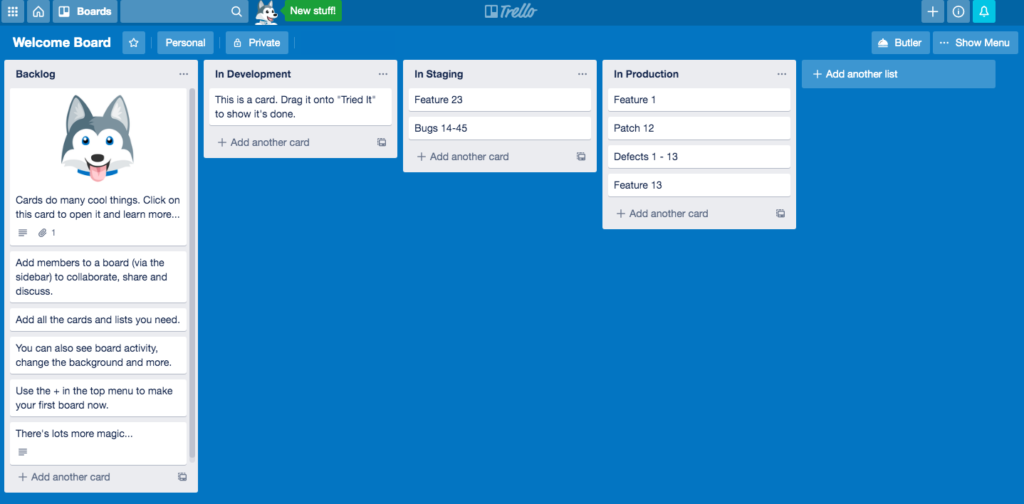
Trello board example.
Here are the top 4 task management tools -
-
Jira, the system of record you will probably inherit. Atlassian's AI is branded Rovo, and its agents ship inside the paid plans. Trello, also Atlassian, if all you need is a lightweight kanban board.
-
Linear, built "for teams and agents". You can assign an issue to an AI agent the way you would to a teammate.
-
Asana, for cross-functional work outside engineering. You can assign work to its AI Teammates, and AI Studio builds automations without code.
-
ClickUp, if you want an all-in-one workspace rather than a pure tracker. Its AI is branded Brain², and ClickUp's own pitch is that it "routes to the best models".
All four have a free tier.
Requirements and PRDs
Yes, every product starts off with this step.
-
Notion, now pitched as "the AI workspace that works for you". This is where I would keep PRDs at a startup.
-
Confluence, the default wiki for Jira shops, with Rovo to find answers across your docs.
-
Google Docs, for the review rounds with everyone outside product. Gemini in Docs builds a full draft from your Drive, Gmail and Chat.
-
Microsoft Word, if your company runs on Microsoft 365. Copilot drafts and polishes inside it.
-
ChatPRD, the one AI-native tool here built specifically for PMs. It drafts and improves PRDs, and it connects your docs to AI coding tools.
Customer interviews and feedback
Every good Product Manager knows the importance of constant customer feedback.
Conducting an efficient interview process is the hallmark of efficient product management.
Basically, this should be a part of every single release.
Following tools help with the customer feedback gathering process -
-
SurveyMonkey, for surveys. Type a prompt that describes what you need and its AI generates the survey.
-
Typeform, for surveys that read like a conversation. Typeform AI builds the form from a prompt.
-
Granola, an AI notepad that uses the meeting context to write your interview notes for you.
-
Dovetail, for synthesising the interviews and feedback once you have them.
-
Canny, for collecting feature requests. Its AI reads your sales and support conversations and shows you what to build.
Mockups and prototypes
Since you are a PM, it is important to give a visual idea to your stakeholders.
In 2026 that can be a working prototype rather than a static wireframe.
-
Balsamiq, the quickest way I know to sketch a low fidelity wireframe. Balsamiq AI turns a description into an editable wireframe.
-
Figma Make, which turns a prompt or an existing Figma design into an interactive, high fidelity prototype.
-
Lovable, where you chat to build a web app, with no technical knowledge needed.
-
v0 by Vercel, an AI agent that creates real code and live prototypes from a prompt.
All but Balsamiq have a free tier.
Roadmapping
Also important to have a strategy in place, I recommend Google's OKR Strategy.
-
Aha! Roadmaps, the most complete strategy-to-roadmap suite on this list. Its AI assistant is called Elle, and you can create custom AI agents for tasks unique to your workflow.
-
Productboard, for roadmaps driven by customer feedback. Its agent, Spark, knows your product, customers and market.
-
Jira Product Discovery, the obvious pick if delivery already runs in Jira. It uses AI to organise feedback and connect it to prioritisation.
-
Linear again, if your engineers already live in it. Roadmaps come from its initiatives and projects.
All but Aha! have a free tier.
Meetings and team communication
As a Product Manager, it is critical to meet stakeholders as often as possible.
Face to face meetings work best.
Plenty of teams are split between office and remote now, so video calls are part of the job either way.
Since you are a Product Manager, learn how to communicate like a champ Product Manager.
-
Zoom Workplace, whose built-in AI summarises meetings and automates next steps.
-
Google Meet, with Gemini automating your notes and translating conversations.
-
Microsoft Teams, unavoidable in a Microsoft 365 company. Copilot in Teams does the meeting recaps.
-
Slack, the usual chat layer for product teams. Its AI summaries are now bundled into paid plans instead of sold as a separate add-on.
-
Loom, now an Atlassian product, for async walkthroughs. Loom AI turns the video into a doc.
Skype was retired in May 2025. Microsoft's advice was that "Skype users can move to Microsoft Teams Free".
Presentations
A great Product Manager can easily convey his or her ideas to diverse audience with ease.
In fact, making solid presentations is an art in itself.
A good presentation is more helpful in convincing stakeholders than endless email chains.
Here are 5 great tools for crafting good presentations -
-
Microsoft PowerPoint, still the enterprise default. Copilot rewrites and reorganises the slides for you.
-
Google Slides, for decks the whole team edits at once. Gemini generates a slide from a prompt and your Drive content.
-
Keynote, if you are on a Mac.
-
Gamma, an AI-native option that generates a deck from a prompt, and websites too.
-
Pitch, a deck tool built for teams. Pitch Agent generates on-brand slides.
Customer onboarding
This may or may not be applicable to your product, especially if it is an internal company tool.
-
Appcues, for in-app onboarding flows. Its AI works from your real product data.
-
Pendo, analytics and in-app guidance in one. It is the only one here with a free tier.
-
Userpilot, whose AI agent, Lia, reads your data and builds the flows itself.
-
Chameleon, with four AI agents that it says "improve your product on autopilot".
-
WalkMe (now part of SAP).
Analytics, heatmaps and experimentation
There is a myth that heatmaps and A/B tests are only for big companies, or too complex to run.
Far from it. Heat mapping is easy, and it is a must for any client facing product.
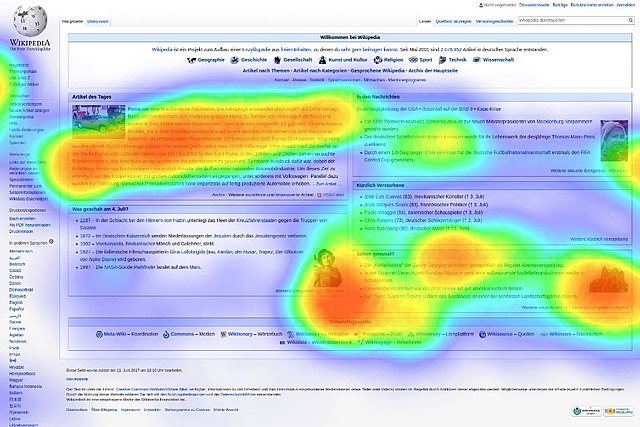
Chart by Tschneidr (resized) · CC BY-SA 4.0 · Source

To understand user experience, some of these tools are very good.
-
Contentsquare (formerly Hotjar), the heatmap and session recording staple, now with AI summaries of both.
-
Microsoft Clarity, heatmaps and session recordings, with AI on top to find the patterns for you.
-
Mixpanel, product analytics with session replay, experiments and feature flags. Its agents monitor the product for you.
-
Amplitude, analytics with AI agents built in. Statsig, the experimentation tool, is now "part of the Amplitude family".
-
PostHog, which keeps analytics, errors and replays in one place and lets your agents query them.
All five have a free tier.
AI assistants
These are the general assistants PMs now use daily.
-
ChatGPT, for drafting messaging and thinking through a decision.
-
Claude, best suited to long documents and specs.
-
Gemini, the natural pick in a Google Workspace shop. Gemini Notebook (formerly NotebookLM) analyses the sources you give it and stays grounded in them, which is what you want for interview synthesis.
-
Perplexity, for competitor and market research, with answers backed by verifiable sources.
-
Microsoft Copilot, "AI built for work", as the Microsoft 365 entry.
All five have a free tier.
For most of a PM's week an off-the-shelf assistant is enough. The case for custom AI over a generic tool starts when the workflow depends on your own data and your own rules.
Best Product Management Tools
Your job is to set up your own individual product management system, choosing the right product planning tool that is best suited for your needs.
There are many free agile tools available out there, including open source Kanban tools.
The benefits of Kanban are the same whichever board you pick.
Even though I may have listed a tool under a particular heading, most of these tools perform multiple tasks.
For example, creating a Jira product roadmap is a common practice and most developers in the agile product management environment are comfortable with a Jira roadmap.
Basically, try to be versatile and not limit your knowledge to only a few tools.
Life Cycle Management
Different tools are needed at different stages of the product life cycle (PLC).
I recommend checking out the ultimate guide to the product lifecycle.
For example, you don't need tools to conduct A/B testing when your product is mature.
Or for that matter, you would prefer doing a market competitor analysis before launching your product, not during the growth stage.
Product Management Tools and Techniques - Summary
Knowing which tools to use depends entirely on your individual product management workflow.
So, you now have the necessary tools to create your next product plan or your next software roadmap.
Follow me on Twitter for the latest updates.
Don't forget to subscribe to my newsletter for occasional notes on product failures and shipping AI in real businesses.
RELATED READING
Asana vs Trello Ultimate Product Comparison - Best 5 Key Differences
Must know best 5 differences for Asana vs Trello. Every Product Manager and Project Manager should compare and check which tool is better for your startups.
Free Jira Tutorial: A Step-by-Step Training Guide
Learn the must know basics in this Jira Tutorial for Beginners. Understand all the critical functions that this wonderful tool can help you with. Basically, Jira is a Product Manager's best friend.
Must Have Product Manager Skills
This is your critical Product Manager Skills List - Your Ultimate Guide to becoming a great PM. These necessary skills will ultimately define your success.
Product Roadmap Guide - Definition and Examples
Why are you building? What are you building? These two questions form the basis of any good product roadmap. Learn how to create the best product roadmap.
What is OKR Framework?
OKR stands for "Objectives and Key Results". To be a successful Product Manager, you need to fully understand the OKR Framework - a must know strategy.
What Is A Healthy Product Backlog - Definition, Ownership and Overview
A healthy product backlog is a necessary starting point for any successful product life cycle. The product backlog is owned and managed by the product team.
Custom AI Agents vs Off-the-Shelf Tools: When Each One Wins
The custom-vs-off-the-shelf question is the most common confusion I see in SMB AI conversations. Owners default to one side or the other based on temperament. Builders want custom. Frugal owners want…
FREQUENTLY ASKED
- What tools does every product manager need?
- At minimum: an issue tracker (Jira, Linear), a docs tool with comments (Notion, Confluence, Google Docs), an analytics tool (Mixpanel, Amplitude, or the platform's native), and a customer research store (notes from interviews, recorded sessions). Add a whiteboard tool (FigJam, Miro) once the team is doing more discovery work.
- Are AI tools replacing traditional PM tools in 2026?
- Augmenting, not replacing. The traditional tools (Jira, Notion, Mixpanel) are adding AI features inside them. Standalone AI tools (Claude, ChatGPT, Cursor for PMs who pair on prototypes) sit alongside. The full replacement pitches haven't held up; the tools that integrate AI into existing workflows are the ones PMs actually use.
- Do solo PMs need the same tool stack as PMs at large companies?
- No. Solo PMs are better off with one good tool per category and skipping the rest. A single docs tool, a single issue tracker, a single analytics tool. The complexity at large companies comes from coordination, which solo PMs don't have. Buying enterprise tools as a solo PM is usually a waste.