Learn the must know basics in this Jira Tutorial for Beginners. Understand all the critical functions that this wonderful tool can help you with. Basically, Jira is a Product Manager's best friend.
A quick note before we start. This guide covers Jira Cloud, which is where nearly every team now runs Jira (Atlassian ended support for the old self-hosted Server edition in early 2024). The branding also changed from "Jira Software" to just "Jira" that same year. Same product, just newer labels.
Familiarity with Jira is at the core of becoming an Agile Product Manager. Remember the Agile Methodology when you think of agile project management.
Jira is independent of your methodology. In other words, whether you use Kanban or Scrum, Jira can easily be used with both methodologies.
Now is also great time to review the top 15 benefits of Kanban.
Jira Product Management
Jira is to a Product Manager, what a stethoscope is to a doctor.
Check out the full list of top 10 product management tools.
Jira for Beginners Overview - Jira Basics
Atlassian Jira software is not only your project management software and product requirement gathering tool.
It is also a bug or defect tracking tool, feature prioritisation tool and release management tool. Everything rolled into one great software!
Think of Jira like a cone of ice cream with different scoops of flavour.

Jira Tutorial for Beginners
Many companies use Jira for various purposes. It is one of the must have skills for a successful Product Manager. But, how to use Jira effectively?
Here is a comprehensive list -
- Documentation - As any good Product Manager knows, documentation can save you in critical situations. Remember, it is an absolute necessity to capture everything in writing. Your requirements, your roadmap and your timelines should be on paper. Also, it is important to maintain a version history of your changes. Confluence can help with that. Also remember to define what is in scope vs what is not in scope. Don't forget the KISS principle!
- Bug or Defect Tracking - I think this feature is Jira's biggest strength. It does an excellent job of tracking defects through the entire lifecycle. Also, you can have various statuses to better track the issue and you can immediately assign a bug to the relevant stakeholder. Finally, everyone can provide comments in a very easy format.
- Feature and User Story Prioritisation - Your entire sprint planning can be done in Jira. It gives you the option to prioritise features and user stories for your Scrum Teams. Your Scrum Teams can also do their user story pointing and provide estimates.
- Release Management - All the hard work ultimately comes down to a successful release. As a Product Manager, you need to make sure that all your deliverables are ready in time for the release. Keeping in some buffer is always a great idea to minimise development uncertainties. Being product agnostic helps.
Jira can also connect to various useful plugins to integrate with your entire development environment.
Jira Basics - Issue Types
This is a Jira defect tracking tool tutorial.
An issue does not refer to a bug or a defect in Jira. It simply refers to a type of documentation in Jira. In the current Jira UI, Atlassian has been renaming "issues" to "work items". You will see both terms for a while; they mean the same thing.
This is also a good time to make sure you know what Scrum does well.
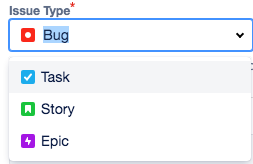
In the default software project configuration, there are four main types of issues in Jira -
- Bug
- Task
- Story
- Epic
There is also the Subtask, which lives under any of the first three. The four main types of issues in Jira are shown below.
Changing Issue Type Workflows
Jira lets you customize which issue types you want for your project.
Jira is probably the best tool for a PM because of the inherent flexibility.
Not only that, Jira also lets you choose the type of workflow you want for each issue type.
You can also choose which fields show up by default, within each issue type.
However, these settings are a bit advanced and you don't need to change them unless absolutely necessary.
Since most fields are not mandatory, there is little merit to modifying these fields.
Jira Tutorial For Beginners - Create a Bug in Jira
So, how to use jira for product management? Creating a bug in Jira is very straightforward.
This is mainly because the vast majority of users use Jira for only bug management.
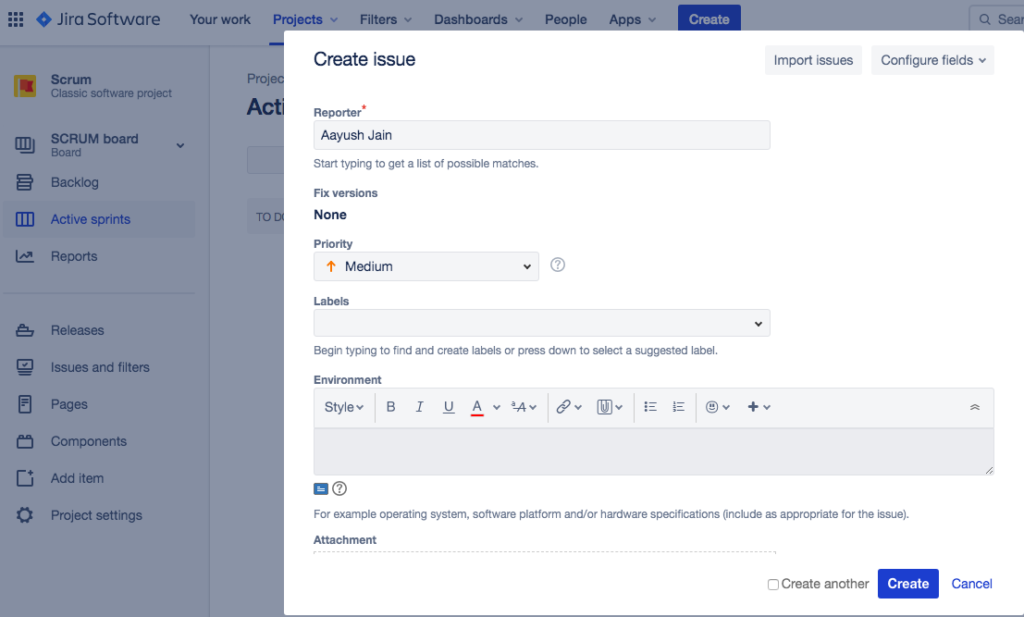
The screenshots in this section are from an older version of Jira. Atlassian has redesigned the interface since, so the layout will look different on your screen, but the fields and the flow are still the same.
Here is a list of all the steps and a description of all the fields -
- Click on the blue "Create" button at the top of the screen
- A pop up open up where you can create any issue type
- By default, that project is selected within which you clicked on the "Create" button
Bug Description Fields
- If you want to change your project, click on the "Project" dropdown to select the project within which you want to create your issue
- Click on the "Issue Type" dropdown
- There are four types of issues listed here (as explained before)
- Select "Bug" as your issue type
- Summary field - Enter a short and descriptive summary for the bug
- Description field - Enter in a detailed description of the bug, possibly including the steps to replicate the bug
Supplementary Bug Fields
Then, you need to enter in data into the following fields -
- Reporter field - By default, the person who clicked on "Create" is filled in, you can also change the name to anyone else on your team
- Priority - Select a priority for this bug
- Labels - This is equivalent to "Tags", and can help you identify similar bugs
- Environment - Select the environment where this bug was noticed (production, staging, development, etc.); this system field only exists in company-managed projects, so team-managed projects will not show it
- Attachment - Attach any supporting screenshots or documents
Bug Link Fields
Finally, here are the last set of fields -
- Linked Issues - Select the type of link this bug has to another issue
- Issue - Select if this bug is dependent on any other bug being fixed (or any other bug is dependent on this bug being fixed); You can also link stories/tasks/epics here
- Assignee - Assign this bug to a person who will investigate it further
- Parent - Select the epic under which work for this bug will be tracked (this field used to be called "Epic Link"; Atlassian merged it into "Parent")
- Sprint - Select the sprint under which work for this bug will be tracked
- Finally, click on the "Create" button and you are all set!
That was the complete list of steps that you need to create a bug in Jira. This completes the create a bug part of the Jira tutorial for beginners.
Jira Tutorial For Beginners - Create a Task in Jira
This is similar to creating a bug in Jira.
Tasks are small pieces of work that are assigned by a Product Manager to the scrum team developers.
Steps to create a task in Jira -
- Click on the blue "Create" button at the top of the screen (as shown before)
- The "Create" popup opens up
- Your default project is selected
Task Fields - First Set
Start out by filling in the following fields -
- Click on the "Project" dropdown if you want to change your project
- Click on the "Issue Type" dropdown
- Four types of issues listed here (as explained before)
- Select "Task" as your issue type
- Summary field - Enter a short description of the task you want to give to your developers
- Attachment - Attach any mockups, design documents or business requirement documents (BRDs)
- Description field - Explain the task in detail, include use cases if possible
Task Fields - Second Set
Here are the final set of fields you need to put in before creating your task -
- Reporter field - This should generally be the Product Manager
- Linked Issues - Select if this task is linked to a bug or another task
- Issue - Select the actual task/bug/defect that you want to link to this task
- Assignee - Assign this task to your developer
- Priority - Assign a priority for this task
- Labels - You can use this as "Tags" to track a bunch of similar tasks/bugs together
- Parent - Select the epic under which this task falls
- Sprint - Assign a sprint to this task
- Click on "Create" to create your task!
Jira Tutorial For Beginners - Jira Report Types
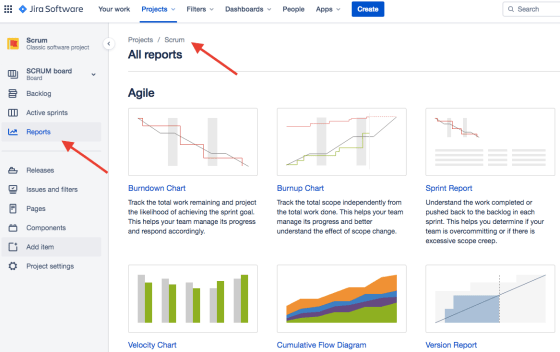
Jira has an immense library of in-built reports and dashboards for your reporting purposes.
You can further customize these reports to suit your needs using a wide variety of tools.
You need to click on the "Reports" link in the left hand navigation menu to access all your reports.
By default, the reports will be for the project that you have already selected.
Jira Tutorial For Beginners - Online Resources
Here is a complete list of all Jira agile online resources that you will potentially need -
- Atlassian Jira Login
- Online courses - Atlassian Learning (free, replaced the old Atlassian University)
- Comprehensive documentation - Jira Cloud support docs
- Admins only - Jira Cloud administration docs
- Scrum Masters - Jira Scrum Tutorial
- Sign up - Get Jira free (free for up to 10 users)
Other Project Management Tools
There are a wide variety of tools available out there. For example, Atlassian also has Trello that is specifically meant for Kanban boards.
While tools like Asana are more broad based.
Check out the top differences for Asana vs Trello.
Jira now ships AI features too, under the Rovo banner (formerly Atlassian Intelligence). Weighing built-in AI like that against building your own? Here is how to think about custom AI vs off-the-shelf tools.
Conclusion - Jira Tutorial for Beginners
You should now have a pretty good idea of how to use Jira. Always remember to communicate like a boss! In good times and bad, the Product Manager is expected to bring clarity for all stakeholders. You may have used similar tools in the past. Or you may plan to use a different tool in the future. That's ok. As long as you have done a clear analysis as to what makes most sense for your company, you are good to go.
Product management in a crisis? Even more important for you to over-use tools like Jira, Confluence, etc.
RELATED READING
Top 15 Benefits of Kanban (and When to Pick It Over Scrum)
Kanban is a critical tool for a successful Product Manager. The top benefits of Kanban include clarity of purpose, clear picture of the project status, etc.
Top 15 Benefits of Scrum (and When It Beats Kanban)
To be a successful Product Manager, you need to know Scrum. The top benefits of Scrum include defined work stream, excellent resource utilisation, etc.
What is Agile Methodology?
What are the Basics of Agile Methodology? You have heard the phrase "Agile Methodology" practically thousands of time. Understanding Agile is at the heart of becoming Product Agnostic.
Top 10 Product Manager Tools (2026)
Free curated list of easy to use, must have top 10 Product Manager tools. These product management tools are recommended to help you become a successful PM!
Asana vs Trello Ultimate Product Comparison - Best 5 Key Differences
Must know best 5 differences for Asana vs Trello. Every Product Manager and Project Manager should compare and check which tool is better for your startups.
What Is A Healthy Product Backlog - Definition, Ownership and Overview
A healthy product backlog is a necessary starting point for any successful product life cycle. The product backlog is owned and managed by the product team.
Custom AI Agents vs Off-the-Shelf Tools: When Each One Wins
The custom-vs-off-the-shelf question is the most common confusion I see in SMB AI conversations. Owners default to one side or the other based on temperament. Builders want custom. Frugal owners want…
FREQUENTLY ASKED
- Is Jira hard to learn?
- The basics take a couple of hours. Creating a project, adding issues, moving them across a board, running a simple sprint. The depth that frustrates people is the admin layer: workflows, permissions, custom fields, automations. Most teams use less than 20% of Jira's capability and that's fine.
- What's the difference between Jira and a kanban board in a project management tool?
- Most modern PM tools have a kanban view. Jira's edge is depth: configurable workflows, reporting, integrations, and the ability to handle complex software development processes. The trade-off is admin overhead. For small teams, a lighter tool is often the right call. For teams running multiple software projects with shared dependencies, Jira's structure earns its weight.
- Do you need a scrum master to use Jira effectively?
- No. Jira works for kanban, scrum, hybrid, or no formal framework at all. The configuration matters more than the framework label. A team running Jira well without a scrum master usually has one person who quietly owns the board hygiene; the role exists informally even if the title doesn't.